
ONLINE INVITATIONS
Free Invitation Templates for Every Occasion
Create beautiful online invitations for birthdays, weddings, parties, baby showers, and every special event with Theecards.com. Choose a design, personalize the details, and send your invitation online in minutes.
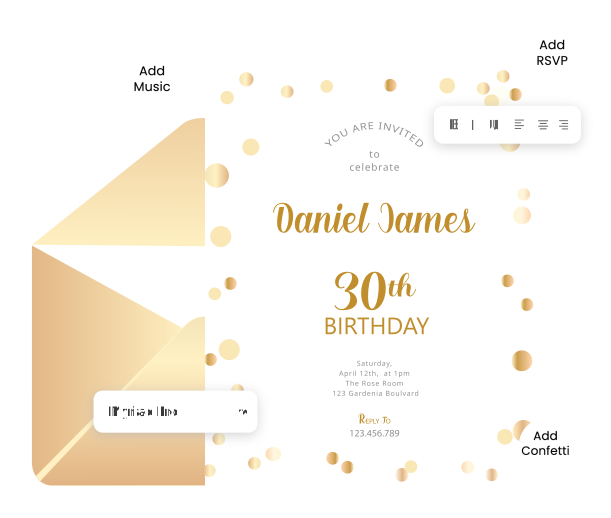
 Edit invitation templates in seconds
- Explore elegant designs for every occasion
- Send invitations online with RSVP, no credit card required
Trusted by Thousands of eCard Senders Worldwide
Theecards.com helps people, teams, families, and communities create beautiful online eCards for every occasion. Celebrate life's special moments with simple, meaningful, and easy-to-send eCards made for every connection.

















How Online Invitations Work?
With Theecards.com, creating online invitations for any event, from birthdays and weddings to baby showers and office parties, is quick, simple, and fun. Just follow these easy steps:

1. Choose a Template
Explore beautifully designed invitation templates for every occasion, whether personal, social, festive, or professional.
2. Customize
Add your event details, message, date, time, venue, RSVP preferences, and personal touches to make the invitation your own.
3. Publish & Share
Publish your invitation and share the link instantly through email, social media, or messaging apps.
Invitation Template Features
Enjoy a smooth and simple invitation experience with Theecards.com. Our free online invitation templates are designed to make every event easier to plan, personalize, and share.

Track RSVP
Collect guest RSVPs online and manage responses with ease.

Download & Print
Download your invitation as a PDF and keep it as a memory.

Free Invitation Templates
Choose from beautifully designed free invitation templates.

Wonderful Designs
Explore templates for every event, theme, and celebration style.

Custom Branding
Add your logo or personal details for a customized touch.

Share Easily
Share your invitation link instantly with guests anywhere.

Invitation Experiences
See why people love creating and sharing online invitations with Theecards.com for birthdays, weddings, baby showers, parties, and professional events.
INVITATIONS SENT IN MINUTES!
"I needed a quick way to invite guests for my birthday dinner. The template was easy to edit, looked beautiful, and I could share it instantly with everyone." – Aanya Mehra
PERFECT FOR SPECIAL EVENTS
"The invitation designs felt elegant and professional. I used one for our engagement party, and guests loved how simple it was to view and respond." – Rhea Kapoor
SO EASY TO SHARE ONLINE!
"Creating party invitations was stress-free. I added the details, shared the link with friends, and everyone received it without any confusion." – Maya Thompson
BEAUTIFUL DESIGNS FOR EVERY OCCASION
"I found exactly the style I wanted for my baby shower invitation. The designs were lovely, and the whole process felt smooth from start to finish." – Linda Chen
Invitation Questions
What is an online invitation, and how is it different from a paper invite?
An online invitation is a digital invite you can customize and send instantly through email, social media, or messaging apps. Unlike paper invites, it is faster, easier to update, and simple to share.
How much does it cost to send an online invitation?
You can create and send invitations on Theecards.com for free. Some premium features may be available for users who want extra customization or advanced options.
How many guests can I invite with one invitation?
You can send your invitation to multiple guests by sharing the invitation link. It is a simple way to reach friends, family, colleagues, or event guests online.
Can I customize my invitation design?
Yes, you can personalize your invitation by editing the text, adding event details, choosing a design, and making it match your occasion or theme.
How do I collect RSVPs from my invitations?
You can use RSVP options to let guests respond online. This makes it easier to track who is attending and plan your event with more clarity.
How do I send my invitation to guests?
You can share your invitation link through WhatsApp, email, social media, or messaging apps. You can also send it directly to guests online.
Is my invitation private and secure?
Your invitation can be viewed through its shared link. This makes it easy to send only to the people you want to invite.
How long will my online invitation remain active?
Your invitation stays available online for a set period depending on the platform settings. You can check your account or invitation details for more information.
Do I need to register to create an invitation?
Yes, creating an account helps you design, save, edit, send, and manage your invitations from one place.
Do guests need to register to RSVP?
No, guests can usually respond directly through the invitation link without creating an account.
What browsers are supported?
Theecards.com works well on modern browsers like Chrome, Safari, Firefox, and Edge for a smooth invitation-making experience.
Can I download or print my invitation?
Yes, you may download or print your invitation if the feature is available for your selected invitation template or plan.
Can I edit my invitation after sending it?
Yes, you can update details like the event date, time, venue, or message after sending. The updated invitation can then be shared with guests.
I did not receive my invitation email. What should I do?
Please check your spam, junk, or promotions folder. You can also resend the invitation link from your account if needed.
Can I delete my invitation after sending it?
Yes, you can delete or remove an invitation from your account when you no longer need it.
Can I send invitations in bulk for corporate events?
Yes, online invitations are useful for office parties, seminars, team events, employee celebrations, and other professional gatherings.
Can I schedule my invitation to send later?
Yes, scheduling lets you prepare your invitation in advance and send it at the right date and time.
Can I track who has opened my invitation?
If tracking is available, you can see guest activity and follow up with people who have not responded yet.
Can I add event reminders?
Yes, reminders can help guests remember the event date, time, and important details before the occasion.
Do you support multi-language invitations?
You can create invitations with your preferred text, which makes it easy to write messages in different languages.
Can I update guests if event details change?
Yes, you can update your invitation details and share the revised invitation link with your guests.
What types of events can I use online invitations for?
You can use online invitations for birthdays, weddings, baby showers, parties, anniversaries, corporate events, festivals, and more.
Can I attach files or links to my invitation?
You can add helpful links such as maps, registries, event pages, or extra details if the selected invitation option supports it.
Is there a mobile app to manage my invitations?
Theecards.com is designed to work smoothly on mobile browsers, so you can create, edit, and share invitations from your phone.